
Everything inside 700 KB
Dấu Việt does more than place tone marks. Below is every feature that works in version 0.9.0 — and what is still missing is listed at the bottom of the page.
1. The input engine
The core job: turning keystrokes into correctly spelled Vietnamese with the tone mark in the right place.
Two layouts
Telex (aa→â, aw→ă,
ee→ê, oo→ô, ow→ơ,
uw→ư, dd→đ; tones s f r x j,
z to clear) and VNI (digits
1–5 for tones, 6 7 8 9 for circumflex,
horn, breve and đ, 0 to clear).
Tone marks by syllable, not by position
The mark lands on the vowel the Vietnamese syllable requires, so the awkward
cases work naturally: quáy, giá, gì,
rượu, khoái, huỳnh,
hoặc. Choose modern (hóa) or
classic (hoà) placement.
Precomposed Unicode
Output is always Unicode NFC — paste into Word, Excel, a browser or Figma and it renders correctly, with no separated diacritics.
w option.2. Mixing in English without friction
The classic problem of every Telex engine: text, password, www.
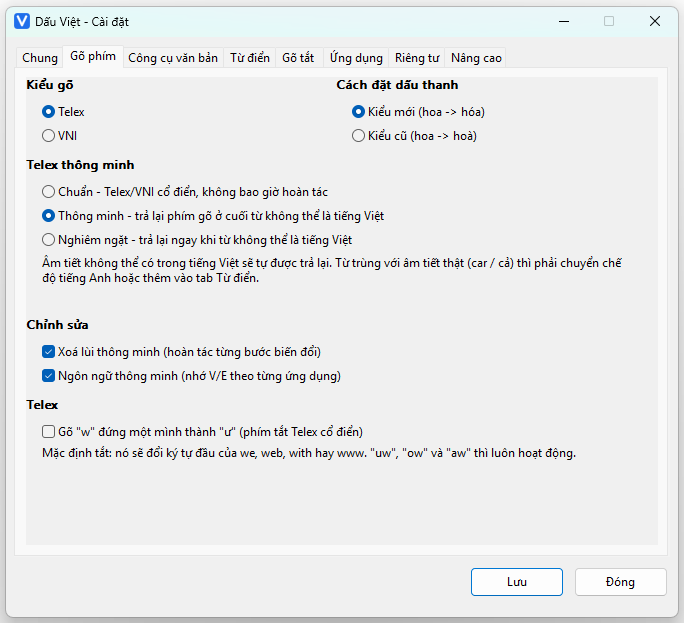
Smart Telex — three levels
Standard: classic Telex/VNI, never rolls anything back.
Smart: at the end of a word, if the result is not a valid
Vietnamese syllable, your original keystrokes are restored.
Strict: restores as soon as the word can no longer be Vietnamese.
Standalone w
Off by default, because it mangles the first character of we,
web, with, window and www.
The pairs uw, ow and aw always work.
E-mail addresses and paths
As soon as the run being typed contains @ or \ the
engine steps aside: [email protected] stays exactly as typed.
Personal dictionary
Words you want permanently immune — ChatGPT,
JavaScript, PostgreSQL, GitHub — added
once and remembered. Import and export to a file.
An honest limitation: some English words typed in Telex produce
a perfectly valid Vietnamese syllable (car→cả,
cast→cát, hair→hải). No Telex engine can avoid that,
which is why Dấu Việt deliberately ships no built-in English word list:
every entry in such a list makes exactly those Vietnamese words impossible to
type. Use the Vietnamese/English switch (Alt+Z) or add the
word to your dictionary.
3. Applications & context
Every program has its own typing habit.
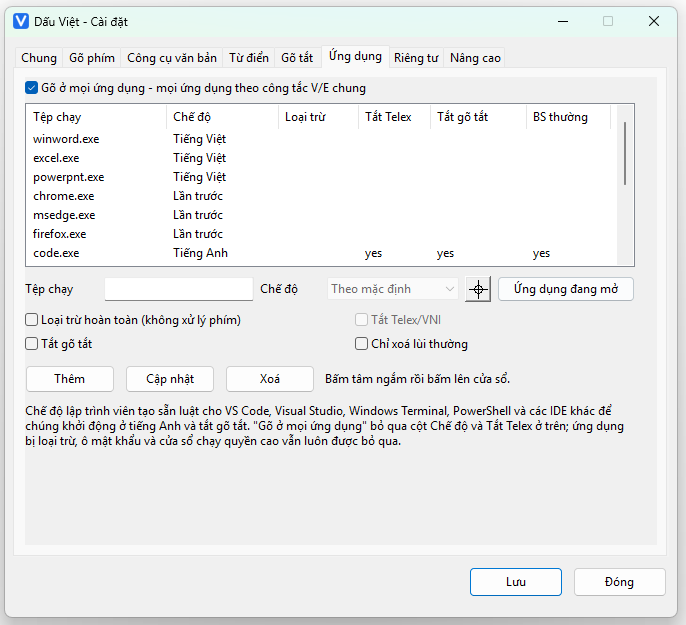
Per-application mode
Keep Word and Excel always in Vietnamese; let browsers use the last state; keep VS Code, Windows Terminal and PowerShell in English with snippets off.
Type in all applications
One checkbox to ignore every per-application rule and type Vietnamese everywhere. The safety guards stay in force: excluded applications, password fields and elevated windows are always skipped.
Pick an application with the mouse
Click the crosshair button, then click any window — Dấu Việt resolves that
window's .exe (packaged UWP apps included) and asks you to confirm
before adding it to the list.
Remembers the language per app
Switch Vietnamese/English in one application and it will be in that state next time you return to it.
4. Text tools
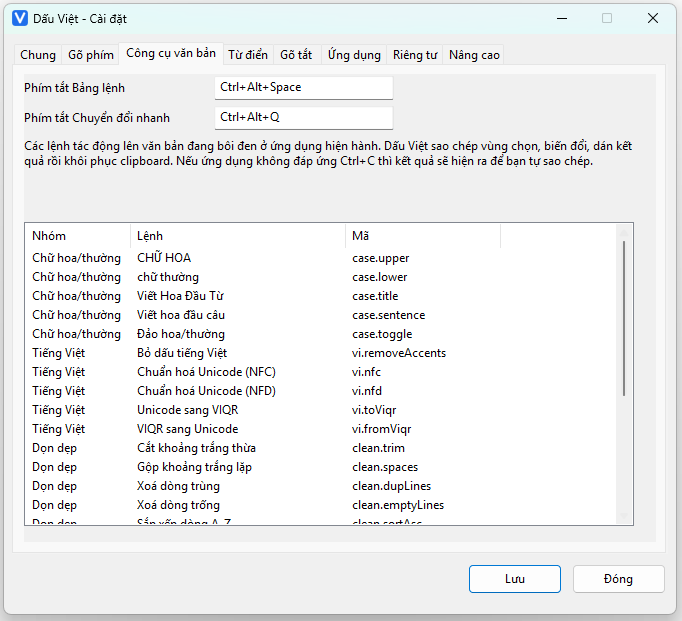
A command palette on Ctrl+Alt+Space, acting on the current selection.
| Group | Commands | Command id |
|---|---|---|
| Case | UPPERCASE · lowercase · Title Case · Sentence case · tOGGLE cASE | case.upper … |
| Vietnamese | Strip diacritics · Normalise NFC · Normalise NFD · Unicode to VIQR · VIQR to Unicode | vi.removeAccents … |
| Clean-up | Trim whitespace · Collapse repeated spaces · Remove duplicate lines · Remove empty lines · Sort lines A→Z / Z→A | clean.trim … |
| Other | Character/word count, slug generation and further transforms — 24 commands in total | — |
Quick Convert
The Ctrl+Alt+Q window lets you paste a block of text, pick one of 20 conversions, review the result and then copy it or save it as UTF-8 — without touching the original.
The clipboard is put back
To replace a selection Dấu Việt borrows the clipboard and then restores it. If an application does not respond to Ctrl+C, the result is shown for you to copy manually instead of silently corrupting your text.
5. Snippets & profiles
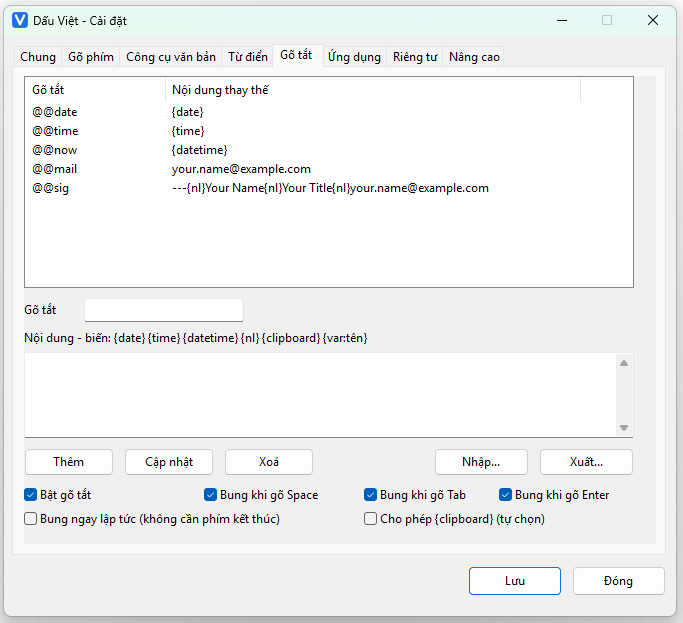
Snippets with variables
Make @@mail expand to your address, @@sig to a
multi-line signature. Content supports {date}, {time},
{datetime}, {nl}, {var:name} and
{clipboard} (opt-in, because it reads the clipboard).
Choose when they expand: on Space, Tab, Enter, or immediately. Snippets can be switched off per application.
Configuration profiles
Three profiles ship by default — Default, Coding, Writing — switched with Ctrl+Alt+P. Each remembers the layout, the Smart Telex level, snippets and the default Vietnamese/English state.
6. Interface & conveniences
Vietnamese and English UI
Switch the interface language on the General tab; every window, menu and notification follows.
Follows the Windows display scale
Change the scale from 100% to 125% or 150% and the windows rebuild at the new size — no blurry or clipped text.
Notification area badge
The V / E badge is drawn at run time so it stays crisp; one click switches language, a double click opens Settings.
Configurable hotkeys
By default Alt+Z switches language, Ctrl+Alt+Space opens the palette, Ctrl+Alt+Q Quick Convert.
Portable mode
Store the settings in a data folder next to the executable and carry it on a USB stick.
Conflicting IME detection
If UniKey, EVKey, GoTiengViet… are running, Dấu Việt warns you straight away — two input methods at once always corrupt text.
What version 0.9.0 does not have
We list it here rather than letting you discover it.
Not implemented
- Text Services Framework (TSF) integration — the current build uses a low level keyboard hook (Tier 1)
- Legacy code pages: TCVN3 (ABC), VNI-Windows, VPS, CP1258
- An .msi installer and a publisher code signing certificate
- macOS and Linux builds
How far it has been tested
The engine has 126 automated tests (790 assertions) plus an end-to-end suite that types 41 mixed Vietnamese/English cases through the real system keyboard.
Application compatibility has been confirmed on Notepad and a plain Win32 edit control. Word, Excel, Chrome and VS Code have not been formally tested, so we make no claim about them, even though the hook works at the Windows keyboard layer.
One specific note: Windows 11 Notepad has its own autocorrect, which can strip a
tone mark from some words (for example quáy → quay).
Turn Autocorrect off in Notepad's settings if you hit it.
Try it in a minute
Download the 313 KB zip, extract it, verify the SHA-256 hash, run it. No installer, and nothing in the registry beyond the start-up option if you enable it.